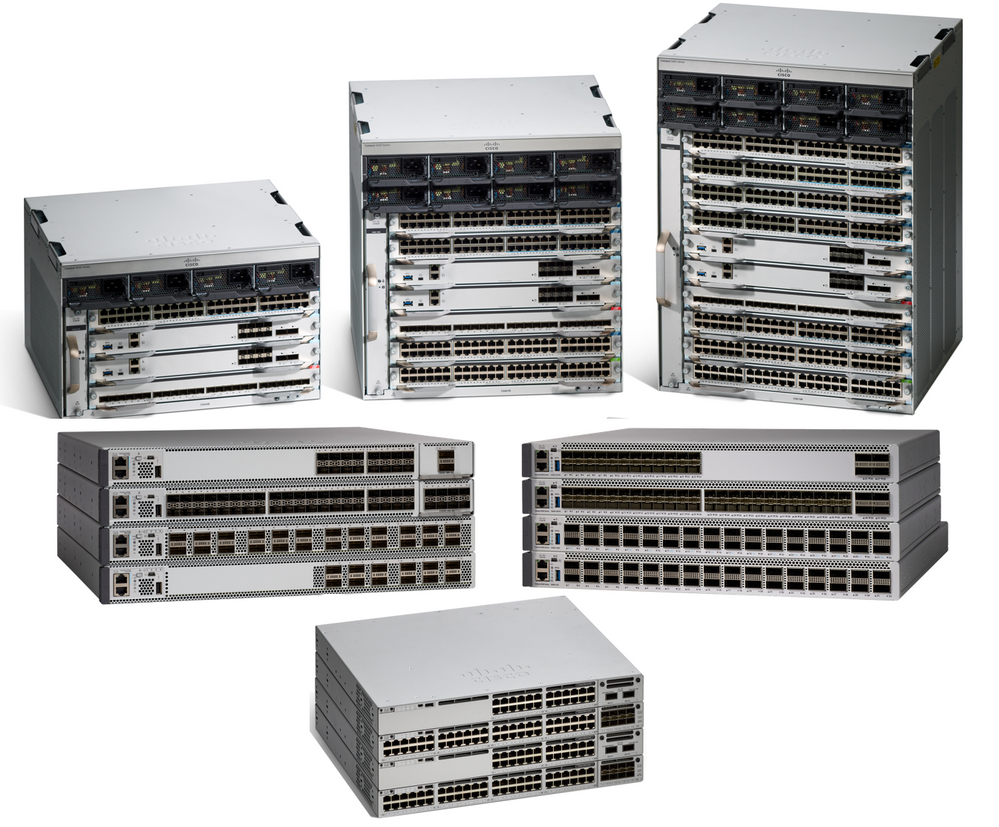
To understand switch and router hardware basically is necessary to implementing network designs that scale. Many Cisco models scale well with the network as it grows. So Cisco has a various series of Cisco routers, switches and other hardware to meet today’s network designs and demands.
It is important to select the proper Cisco hardware to meet current network requirements while designing a network, as well as to allow for network growth. Especially in an enterprise network, both switches and routers play a critical role in network communication. So in this article we will introduce some main tips to select the very right Cisco switch or Cisco router for your networks (mainly for enterprise networks)
There are five categories of switches for enterprise networks

Campus LAN Switches: To scale network performance in an enterprise LAN, there are core, distribution, access, and compact switches. These switch platforms vary from fanless switches with eight fixed ports to 13-blade switches supporting hundreds of ports. Campus LAN switch platforms include the Cisco 2960, 3560, 3750, 3850, 4500, 6500, and 6800 Series.
Cloud-Managed Switches: The Cisco Meraki cloud-managed access switches enable virtual stacking of switches. They monitor and configure thousands of switch ports over the web, without the intervention of onsite IT staff.
Data Center Switches: A data center should be built based on switches that promote infrastructure scalability, operational continuity, and transport flexibility. The data center switch platforms include the Cisco Nexus Series switches and the Cisco Catalyst 6500 Series switches.
Service Provider Switches: Service provider switches fall under two categories: aggregation switches and Ethernet access switches. Aggregation switches are carrier-grade Ethernet switches that aggregate traffic at the edge of a network. Service provider Ethernet access switches feature application intelligence, unified services, virtualization, integrated security, and simplified management.
Virtual Networking: Networks are becoming increasingly virtualized. Cisco Nexus virtual networking switch platforms provide secure multitenant services by adding virtualization intelligence technology to the data center network.
Network administrators must determine the switch form factors while selecting switches. These include the fixed configuration, the modular configuration, the stackable configuration and the nonstackable configuration.
Fixed Configuration Switches

Modular Configuration Switches

Stackable Configuration Switches

The height of the switch, which is expressed in the number of rack units, is also important for switches that are mounted in a rack. For example, the fixed configuration switches shown in Fixed Configuration Switches are all one rack unit (1U) high.
In addition to these considerations, the following list highlights other common business considerations when selecting switch equipment:
- Cost: The cost of a switch will depend on the number and speed of the interfaces, supported features, and expansion capability.
- Port Density: Network switches must support the appropriate number of devices on the network.
- Power: It is now common to power access points, IP phones, and even compact switches using Power over Ethernet (PoE). In addition to PoE considerations, some chassis-based switches support redundant power supplies.
- Reliability: The switch should provide continuous access to the network.
- Port Speed: The speed of the network connection is of primary concern to end users.
- Frame Buffers: The ability of the switch to store frames is important in a network where there might be congested ports to servers or other areas of the network.
- Scalability: The number of users on a network typically grows over time; therefore, the switch should provide the opportunity for growth.
The port density of a switch refers to the number of ports available on a single switch. The following shows the port density of three different switches.

Fixed configuration switches typically support up to 48 ports on a single device. They have options for up to four additional ports for small form-factor pluggable (SFP) devices. High-port densities allow for better use of limited space and power. If there are two switches that each contain 24 ports, they would be able to support up to 46 devices, because at least one port per switch is lost with the connection of each switch to the rest of the network. In addition, two power outlets are required. Alternatively, if there is a single 48-port switch, 47 devices can be supported, with only one port used to connect the switch to the rest of the network, and only one power outlet needed to accommodate the single switch.
Modular switches can support very high-port densities through the addition of multiple switch port line cards. For example, some Catalyst 6500 switches can support in excess of 1000 switch ports.
Large enterprise networks that support many thousands of network devices require high-density, modular switches to make the best use of space and power. Without using a high-density modular switch, the network would need many fixed configuration switches to accommodate the number of devices that need network access. This approach can consume many power outlets and a lot of closet space.
The network designer must also consider the issue of uplink bottlenecks: A series of fixed configuration switches can consume many additional ports for bandwidth aggregation between switches, for the purpose of achieving target performance. With a single modular switch, bandwidth aggregation is less of an issue, because the backplane of the chassis can provide the necessary bandwidth to accommodate the devices connected to the switch port line cards.
Forwarding rates define the processing capabilities of a switch by rating how much data the switch can process per second. Switch product lines are classified by forwarding rates.
Forwarding Rate

Entry-level switches have lower forwarding rates than enterprise-level switches. Forwarding rates are important to consider when selecting a switch. If the switch forwarding rate is too low, it cannot accommodate full wire-speed communication across all of its switch ports. Wire speed is the data rate that each Ethernet port on the switch is capable of attaining. Data rates can be 100 Mb/s, 1 Gb/s, 10 Gb/s, or 100 Gb/s.
For example, a typical 48-port gigabit switch operating at full wire speed generates 48 Gb/s of traffic. If the switch only supports a forwarding rate of 32 Gb/s, it cannot run at full wire speed across all ports simultaneously. Fortunately, access layer switches typically do not need to operate at full wire speed, because they are physically limited by their uplinks to the distribution layer. This means that less expensive, lower-performing switches can be used at the access layer, and more expensive, higher-performing switches can be used at the distribution and core layers, where the forwarding rate has a greater impact on network performance.
Power over Ethernet (PoE) allows the switch to deliver power to a device over the existing Ethernet cabling. This feature can be used by IP phones and some wireless access points.
Power over Ethernet

PoE allows more flexibility when installing wireless access points and IP phones, allowing them to be installed anywhere that there is an Ethernet cable. A network administrator should ensure that the PoE features are required, because switches that support PoE are expensive.
The relatively new Cisco Catalyst 2960-C and 3560-C Series compact switches support PoE pass-through.
PoE Pass-Through

PoE pass-through allows a network administrator to power PoE devices connected to the switch, as well as the switch itself, by drawing power from certain upstream switches.
Multilayer switches are typically deployed in the core and distribution layers of an organization’s switched network. Multilayer switches are characterized by their ability to build a routing table, support a few routing protocols, and forward IP packets at a rate close to that of Layer 2 forwarding. Multilayer switches often support specialized hardware, such as application-specific integrated circuits (ASIC). ASICs, along with dedicated software data structures, can streamline the forwarding of IP packets independent of the CPU.
There is a trend in networking toward a pure Layer 3 switched environment. When switches were first used in networks, none of them supported routing; now, almost all switches support routing. It is likely that soon all switches will incorporate a route processor because the cost of doing so is decreasing relative to other constraints. Eventually the term multilayer switch will be redundant.
The Catalyst 2960 switches illustrate the migration to a pure Layer 3 environment.

Cisco Router Tips
Like switches, routers can play a role in the access, distribution, and core layers of the network. In many small networks like branch offices and a teleworker’s home network, all three layers are implemented within a router.
In the distribution layer of an enterprise network, routing is required. Without the routing process, packets cannot leave the local network.
Routers play a critical role in networking by interconnecting multiple sites within an enterprise network, providing redundant paths, and connecting ISPs on the Internet. Routers can also act as a translator between different media types and protocols. For example, a router can accept packets from an Ethernet network and reencapsulate them for transport over a serial network.
Routers use the network portion of the destination IP address to route packets to the proper destination. They select an alternate path if a link goes down or traffic is congested. All hosts on a local network specify the IP address of the local router interface in their IP configuration. This router interface is the default gateway.
Routers also serve the following beneficial functions.
With the enterprise and the ISP, the ability to route efficiently and recover from network link failures is critical to delivering packets to their destination.
There are three categories of routers:


- Branch Routers: Branch routers optimize branch services on a single platform while delivering an optimal application experience across branch and WAN infrastructures. Maximizing service availability at the branch requires networks designed for 24x7x365 uptime. Highly available branch networks must ensure fast recovery from typical faults, while minimizing or eliminating the impact on service, and provide simple network configuration and management.
- Network Edge Routers: Network edge routers enable the network edge to deliver high-performance, highly secure, and reliable services that unite campus, data center, and branch networks. Customers expect a high-quality media experience and more types of content than ever before. Customers want interactivity, personalization, mobility, and control for all content. Customers also want to access content anytime and anyplace they choose, over any device, whether at home, at work, or on the go. Network edge routers must deliver enhanced quality of service and nonstop video and mobile capabilities.
- Service Provider Routers: Service provider routers differentiate the service portfolio and increase revenues by delivering end-to-end scalable solutions and subscriber-aware services. Operators must optimize operations, reduce expenses, and improve scalability and flexibility to deliver next-generation Internet experiences across all devices and locations. These systems are designed to simplify and enhance the operation and deployment of service-delivery networks.
Network administrators in an enterprise environment should be able to support a variety of routers, from a small desktop router to a rack-mounted or blade model. More Cisco routing devices in the market are the Cisco ISR G2 Series Routers. How to select a proper Cisco router? You can read more about the tips of selecting Cisco ISR G2 Series for your network.
Reference from http://www.ciscopress.com/articles/article.asp?p=2189637&seqNum=5